Recent Posts - Page 15

Rolling up my Sleeves, continued

November 27, 2007

It’s been about a year and a half since I wrote about my wrist pains that would often occur at work, which was being caused by something I bet many of us deal with from time to time… Repetitive Strain Injury. So, I’ve been wearing these gloves when I’m at work on my normal Apple keyboard. I knew that they helped to some degree because on the days that I forgot them, my wrists would begin to hurt after a hour or two of coding/writing emails. Not much fun.

A few months ago, I attempted to start typing with Dvorak, which started off with requiring myself to do it for about three hours each morning to start the day and then switching back. After about a week and a half, I forgot to continue doing it. The Dvorak keyboard sits next to my desk… whispering to me, “play with me”… but I haven’t had time to get back into it.

So, the strain continues from time to time. Over the course of a few months, I began to notice that most of the strain seemed to be in my right wrist and I started to wonder if the mouse movements were a bigger culprit than the keyboard itself. So, I spoke to a guy at Macforce (a cool and local Apple dealer) about the mouse pad that he was using. He said that it really helped him out and so I bought myself one.

It’s a Belkin WaveRest™ Gel Mouse Pad and cost me less than $30 USD. It’s been a few weeks and I’ve noticed that I can go almost the entire day without the gloves that I wore before. So, I think that there is still some strain occurring, but a lot less than before. So, I’m hoping to give Dvorak another shot and hope that combo helps alleviate a lot of pain that I’ve been experiencing at work.

If you’re experiencing wrist pains and it’s focused on the hand that you use your mouse with, you might consider something like this to help out.

I’m sure that I’m not the only one that has/is experienced motion strain at the computer.. so, what has been your experience and have you had any success making improvements to your work space to help?

Moved to our new studio

November 21, 2007

One of the reasons why I’ve been too busy to write on my blog lately is that we recently moved into to a new studio. We had a lot of preparation to do before we moved in and are finally getting settled in the new space.

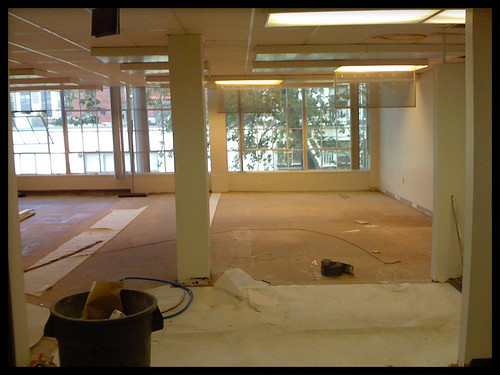
We took the space from…

Planet Argon - Studio BEFORE
improvements

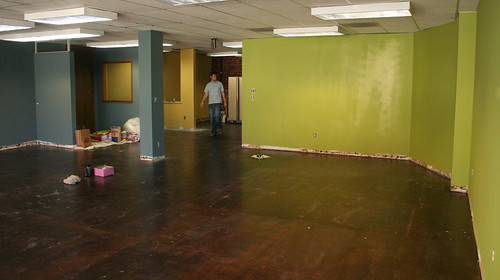
To this…

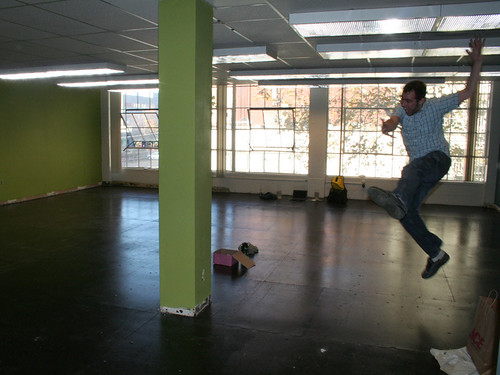
As you can see.. we have lots of natural light for the entire team…

I think that Chris Griffin shares the same excitement that I do about the new space. ;-)

Chris Griffin jumps for
joy!

We’ll be posting more photos on the Planet Argon flickr stream over the coming weeks as we get the studio organized. :-)

Zeldman on Web Design

November 20, 2007

In a new article on A List Apart, Jeffrey Zeldman writes:

“Some who don’t understand web design nevertheless have the job of creating websites or supervising web designers and developers. Others who don’t understand web design are nevertheless professionally charged with evaluating it on behalf of the rest of us. Those who understand the least make the most noise. They are the ones leading charges, slamming doors, and throwing money—at all the wrong people and things.”

He goes on to describe Web Design as, “as the creation of digital environments that facilitate and encourage human activity; reflect or adapt to individual voices and content; and change gracefully over time while always retaining their identity.”

Read the rest of the article, Understanding Web Design on alistapart.com.

Skitch... my favorite desktop application of 2007?

November 20, 2007

It just occurred to me that my first Skitch was on July 7th, 2007. 7/7/7. I’ve been meaning to post an article about how Skitch has changed the way our team approaches reporting bugs and communicating ideas visually.

First of all, the Skitch web site advertises it (see video) as a fun tool for playing with photos and sharing stuff with friends/family. While this is true, I think their bigger market could be those of us who work in the web design and development community. It took a less than a week for Skitch to become a tool that I rely on the most during my day to day work and since it keeps surprising me that people aren’t using it and/or haven’t heard about it… I thought that I’d share how we’re using it at Planet Argon.

Introducing “LOLBUGZ”

Our team is currently using Lighthouse for managing bugs/tickets for internal and client projects. If there is one way to slow down bug fixing cycle.. .it’s the ticket submission process. It takes a lot of time and commitment to try and communicate some problems that you’ll find in a web application. This is why screenshots can be so useful to helping speed up the process. Skitch allows us to not only provide a screenshot really quickly, but it gives us the ability to focus our attention with shapes and text, which provides more context when viewing an image.

For example, here are a few real-world Skitches that I’ve used to report some problems.

What happened to this drop down?

This pagination needs some CSS-Love!

Oh no! Tags are getting grouped together…

Styling has gone crazy…

I mastered an unordered list! (hooray!!)

This list isn’t scaling anymore…

Side note: LOL BUGZ was a term coined by Rick Olson at Active Reload to describe the tickets that I post for Lighthouse. ;-)

Trying out 15 during the initial releases for the iPhone… bug report sent via twitter to Erik Kastner.

As you can see, using Skitch helps communicate some very specific things without needing to type a huge description. Of course, we do try our best to add more context with our tickets. For example, here is a real-world example of a ticket that I posted on Lighthouse. As you’ll see, there are a few skitches embedded in the tickets, which works much better than attaching screenshots to tickets.

One of the best features of Skitch is it’s work-flow. Within a few seconds, I can do the following tasks.

  • Take a screenshot of a specific region of my screen
  • Add some arrows and text
  • Click on Webpost, which will upload directly to myskitch.com
  • Click on Share to navigate to the new upload
  • Click on the embed textfield and it uses JS to copy the embed
html into my paste buffer
  • Paste the html snippet directly into the ticket that I’m reporting
  • Submit my LOL BUG

Side note: it also allows you to upload to Flickr, a ftp account, etc.

Over the past four months, Skitch has become one of my favorite OS X tools. The interface is lightweight and the workflow is almost perfect (feature request: providing the embed code in my paste buffer without needing to go to myskitch would be A+)

I’ve also used Jing, which works on Windows and OS X and does video. I’ve not found it to be as intuitive for working in this manner. In fact, the work-flow leaves a lot to be desired. However! It does do video and this has come in handy a few times for showing people some “live” interaction-type bugs that can’t be communicated as easily through text/images.

If you’re not using Skitch yet and are on OS X… I highly recommend that you try it out for a few weeks during a bug fixing sprint. We’ve gotten our clients and almost everybody on the team using it in this fashion. The productivity increases haven’t gone unnoticed.

That’s not to say that it’s not fun for point out things that aren’t related to your project bugs. ;-)

Happy Skitching!

UPDATE

Plasq liked the writeup and gave me 50 extra invites to pass out for Skitch. So, if you’re in need of one… ask me via email. Thanks Plasq team!

Master/Slave Databases with Ruby on Rails

November 15, 2007

Not terribly long ago, I announced Active Delegate, which was a really lightweight plugin that I developed to allow models to talk to multiple databases for specific methods. The plugin worked great for really simple situations, like individual models.. but when it came time to test with associations it fell apart. I haven’t had a chance to work on any updates and knew that it was going to take more work to get it going.

Earlier this week, we helped one of our bigger clients launch their new web site1. For the deployment, we needed to send all writes to a master database and a reads to slaves (initial deployment is talking to almost 10 slaves spread around the globe!). We needed something to get integrated quickly and decided to ditch Active Delegate for the time being and began looking at the following options.

I spoke with Rick Olsonv2 and he pointed me to a new plugin that he hasn’t really released yet. So, I’m going to do him a favor and announce it for him. Of course… I got his permission first… ;-)

Announcing Masochism!

Masochism3 is a new plugin for Ruby on Rails that allows you to delegate all writes to a master database and reads to a slave database. The configuration process is just a few lines in your environment file and the plugin takes care of the rest.

Installing Masochism

With piston, you can import Masochism with:

  1. Contiki, a cool travel company we’re working with 

  2. Rick just moved to Portland… welcome to stumptown! 

  3. The Masochism plugin README 

Starting MySQL after upgrading to OS X Leopard

October 27, 2007

If you upgraded to OS X Leopard and are running MySQL from the MySQL.com installer[^1^](#fn1){#fnref1 .footnote-ref role=”doc-noteref”}, you might be having some problems with starting it from the GUI interface. There isn’t a fix from MySQL yet, so to get around that… you can run it from the command-line.

Start MySQL from the command line

cd /usr/local/mysql; ./bin/mysqld_safe &

This should get MySQL up and running for you. If someone wants to share a tip on how to get this to start automatically on reboot, please post a comment and I’ll help get the word out.


  1. ::: {#fn1}
I didn't have this problem as I [installed MySQL via
MacPorts](http://www.robbyonrails.com/articles/2007/06/19/installing-ruby-on-rails-and-postgresql-on-os-x-second-edition..).
but this came up for a few members of [PLANET
ARGON](http://planetargon.com) after they upgraded to
Leopard.[↩︎](#fnref1){.footnote-back role="doc-backlink"}
:::

OS X Leopard Tip: Skitch on Every Space

October 26, 2007

If you’re using Skitch and the new Spaces in OS X Leopard, I would encourage you to set the following up.

::: thumbnail skitch on every
space
Uploaded with Skitch!{style=”font-family: Lucida Grande, Trebuchet, sans-serif, Helvetica, Arial; font-size: 10px; color: #808080”} :::

This will allow you to use Skitch on any Space without needing to move it around. Took me a few minutes to figure out that I could set it up like this.

As you can see… I’m on Leopard now… only took three tries.

Spice up your Terminal with colored grep pattern results

October 06, 2007

Earlier, I came across a post by Garry Dolley, which he shows how to acheive colorized grep matches in bash. I recall having color matches when I used to use Linux on a daily basis as my primary work environment, but haven’t gotten around to setting this up on my MacBook, which is where I do almost all of my development work.

Before

If you don’t already have colors, a grep in your terminal might look something like the following screenshot.

While, I have a very small output here, this gets much crazier when you’re using egrep across an entire project. It’s hard to scan through all of the results for the inline pattern matches.

So, taking Garry’s suggestion (for bash), I did something similar with my favorite shell, Z shell.

Add the following to your ~/.zshrc file to begin experimenting with the colors.

Multiple Database Connections in Ruby on Rails

October 05, 2007

We have a client that already has some database replication going on in their deployment and needed to have most of their Ruby on Rails application pull from slave servers, but the few writes would go to the master, which would then end up in their slaves.

So, I was able to quickly extend ActiveRecord with just two methods to achieve this. Anyhow, earlier today, someone in #caboose asked if there was any solutions to this and it prompted me to finally package this up into a quick and dirty Rails plugin.

Introducing… Active Delegate!

To install, do the following:

cd vendor/plugins;
piston import http://svn.planetargon.org/rails/plugins/active_delegate
```text
Next, you'll need to create another database entry in your
`database.yml`.

```yaml
login: &login
  adapter: postgresql
  host: localhost
  port: 5432

development:
  database: rubyurl_development
  <<: *login

test:
  database: rubyurl_test
  <<: *login

production:
  database: rubyurl_servant
  <<: *login

# NOTICE THE NEXT ENTRY/KEY
master_database:
  database: rubyurl_master
  <<: *login
````ruby
At this point, your Rails application won't talk to the
`master_database`, because nothing is being told to connect to it. So,
the current solution with Active Delegate is to create an ActiveRecord
model that will act as a connection handler.

````ruby
# app/models/master_database.rb
class MasterDatabase < ActiveRecord::Base
  handles_connection_for :master_database # <-- this matches the key from our database.yml
end  
```text
Now, in the model(s) that we'll want to have talk to this database,
we'll do add the following.

````ruby
# app/models/animal.rb
class Animal < ActiveRecord::Base
   delegates_connection_to :master_database, :on => [:create, :save, :destroy]
end

Now, when your application performs a create, save, or destroy, it’ll talk to the master database and your find calls will retrieve data from your servant database.

It’s late on a Friday afternoon and I felt compelled to toss this up for everyone. I think that this could be improved quite a bit, but it’s working great for the original problem that needed to be solved.

If you have feedback and/or bugs, please send us tickets.

PLANET ARGON is seeking fresh talent... could it be you?

October 04, 2007

My blog has been fairly quiet lately because our team has been busy helping push a few big client projects out the door. We’ll be posting announcements about those launches on the PLANET ARGON Blog soon, so stay-tuned there!

We’ve been growing the design-side of our team lately, but we’re also still seeking some more Rails-talent in Portland, OR. If you’re in Portland or interested in moving here1, you should introduce yourself to our team. We’re looking for people to work on-site in Portland, so any remote candidates will be turned away… we’re moving into a shiny and new office space in downtown and are looking for another developer to join our Design and Development team.

PLANET ARGON goes
hiking you’ll fit in really well if you’re into outdoor activities… ;-)

We’re seeking mid-level Ruby on Rails developers that can pick things up quickly. Having some experience with RSpec will go along way with us. Ideal candidates would have great communication skills and be able to work in a fast-paced environment that places a huge emphasis on collaboration between designers and developers (let’s not forget to mention our clients). Bring what you already know and learn the rest with us.

While everyone might have Wii’s in the office, we’ve taken it to the next level with Speed Stacking! :-p

To apply, send an email to <af22+8509@c1.catchthebest.com>,

Side note: We’re giving Catch the Best a whirl to review job candidates. If you’re hiring people, you might consider giving it a try.


  1. Everybody is moving to Portland… ;-)Â